
 Blog
Blog Where did the “Align Drawing View” command go?
I have recently had a
couple of customers call in and ask how to take a view that is at an angle and
make one of the edges horizontal or vertical?
I quickly, in all of my wisdom, say that you need to use the Align
Drawing View command under “Tools, Align Drawing View” and select either
horizontal or vertical.
The customer says “I am in Tools but I do not see Align
Drawing View”. What has happened is the
command has been turned off. The help
menu explains what the command does but it doesn’t tell you how to turn it on
if it gets cut off. What you need to do
is go to “Tools” and select “Customize Menu” at the bottom.

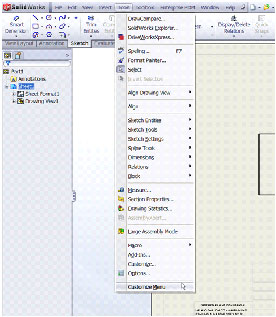
Then you need to make sure that “Align Drawing View” is
checked.
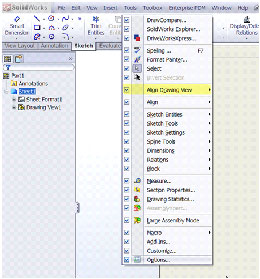
So, if you need to align a drawing view but cannot find the
command, it is probably just turned off.
Just follow the steps above and you will be creating the detail drawings
that you want.
Phil Whitaker
CATI Technical Support
